SIGCSE Virtual 2026 (series) /
Video Submission Guidelines
Video Submission Instructions
Please note that all presenters of papers, posters, and spotlight talks are required to prepare a video that will be available to attendees. Presenters must also submit a caption file for the video. The maximum length of the video presentations is as follows:
- Papers: 15 minutes
- Posters/Spotlight Talks: 5 minutes
Video and caption files are due Tuesday, October 27, 2026.
- Create your video. You’ll need to record your video and edit captions for accuracy.
- Collect the following information:
- (Primary) Corresponding author name
- (Primary) Corresponding author email used to register for SIGCSE Virtual 2026
- Title of your submission
- ID number of your submission (available in EasyChair)
- Name your video file “ID number_title”.mp4. For example, “189-paper what drives students to office hours.mp4”; spaces or dashes are up to you. Use the same name for the .vtt caption file.
- Upload the video and the caption file to the video submission form by the deadline. Link to the submission form: https://forms.gle/jKyqupMm9BiCzip67
Additional Guidelines
- Use a single stationary camera.
- Ensure that your video does not cover the text on your slides. Do a test recording so you know where your video will be in relation to your slides.
- Use Picture-in-Picture to display both the presenter and slide content.
- You will need to generate captions and edit them for accuracy before submission. See detailed instructions below.
- Leave the bottom 25% of the video empty for captions, either by leaving the bottom of your slides blank or adding a section under the slides. See an example below:
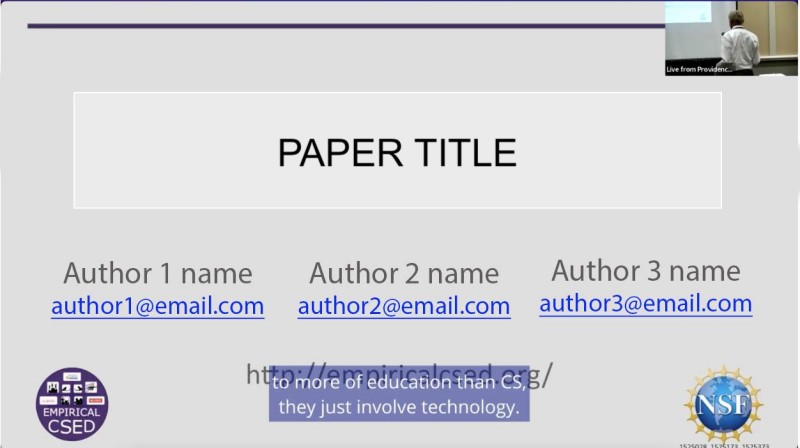
- Upload the recorded video and captions based on the directions provided.
- Your title slide can be labeled with the date, time, and session information (from the program). It should also include the ACM logo. ACM logos can be found in the ACM style guide.
- For ease of recording, generating captions, and editing those captions, we recommend using Zoom. You should be able to use either an institutional or free account to do so.
- If you choose to record with other software, you will still need to generate and edit your captions. You can find instructions for generating automatic captions via YouTube. Note that captions can be edited in YouTube.
File Formats
- Convert each recording to a QuickTime Movie format (.mp4 or .m4v) optimized for streaming. The video should be 8GB or less.
- Your caption file should be submitted as a .vtt file.
Recording and Editing Captions in Zoom
- In order to generate a caption file (which Zoom calls a “transcript”), you will need to record to the cloud (rather than to your local computer).
- For audio quality, Zoom recommends:
- Keeping background noise to a minimum.
- Speaking clearly into the microphone and refraining from shuffling papers.
- Placing the microphone near active speakers..
- Using an external microphone for better sound quality.
- You will need to edit the captions that are generated via Zoom to ensure that they are accurate. Consider whether words are spelled correctly, speakers are identified accurately, and punctuation is correct. To edit the captions:
- Log into the Zoom web portal and navigate to Recordings and Transcripts > Cloud Recordings.
- Follow the directions To View or Edit an Audio Transcript.
- Clicking on the transcript will take you to that part of the video
- Download your recording files. You will see both an .mp4 file and the .vtt file that you will need to submit.
- Looking for more tips?
- Check out this blog post about recording in Zoom
- See videos about recording on Zoom and editing captions
- Join us for Office Hours on Wednesday, Sep 23, 2026 at 3 pm Pacific/6pm Eastern. Register for Office Hours via Zoom. If you are unable to attend live, register and we will send you the recording.
Universal Design Considerations
- When presenting, read critical text and describe critical visuals. Ensure that blind attendees receive the same information as sighted attendees.
- Don’t rely on color alone to communicate information. Consider alternatives like labels and patterns so that all participants, including those affected by colorblindness, can understand the information.
- Choose reading-friendly fonts whose letter shapes are easily recognized and differentiated, such as Arial, Verdana, and Tahoma.
- Use large font sizes, such as 36 points or larger, for title slides and 24 points or larger for main body texts.
- Ensure appropriate color contrast of your slides to make your content more visible to viewers. You can use WebAIM’s color contrast checker to verify.
- Avoid animations and visual effects that could trigger an adverse reaction, such as flashing lights, loud sounds, or repetitive alarms.
- If you are recording your face or torso:
- Use a solid color background that does not move.
- Select clothes that will not cause a moire effect or aliases in your video.
- Ensure lighting is consistent artificial lighting (sunny with clouds means lighting might change as you record) coming from behind the camera or have it bounce off of a white wall or ceiling to better diffuse it.
- Recommended: 1080p format (1920×1080 with a 16:9 aspect ratio).